It was really a wise decision to select NEC and NajTech as technology partners. Our choice proved to be right on the sad occurrence of the Jeddah floods of 2011. We were switched over to ONLINE MODE within few minutes through our other Disaster Recovery Site Link and we are proud to have NEC EXPRESSCLUSTER installed within our IT Infrastructure as a Disaster Recovery Contingency Plan. Mr. Labib Assaf, UCA IT Technical Manager
For all applications / Physical, Virtual and Cloud
Feature
Specification
1. Wide support of clustering configuration
Shared Disk Type / Data Mirroring Type / Hybrid Clustering No Hardware / Application dependency LAN / WAN configuration Physical / Virtual configuration Cloud environment support (AWS, etc) Active-Standby / Active-Active / M+1 Standby / M+n Standby, etc Both automated and manual failover suppot
2. Wide range monitoring capability
Monitors network, hardware, OS and application not to miss a failure which leads to system disruption By using dedicated monitoring agent, EXPRESSCLUSTER X can detect not only application termination but also abnormal status or hang-up status of the application through its proactive response monitoring.
Enables to monitor Windows and Linux system with integrated viewer Intuitive GUI for clustering configuration to prevent setting mistake Cluster configuration can be extracted to configuration file which can be applied to another cluster
4. Various resolution methods to prevent Split-Brain (*)
Realize accurate alive monitoring against other servers by multiple use of heartbeat path (LAN heatbeat, COM heartbeat, Disk Heartbeat and LAN Kernel heartbeat)
(*) Split-Brain is the condition where two or more nodes in the cluster becomes active due to disconnection of all the network between nodes.
Fast, efficient & cost effective
Feature
Specification
5. Efficient use for narrow network environment
Enables to transfer data by compress before sending it to network. Average 50% reduction I data size as compared to the normal transfer.
6. Quick resynchronization by Fast Sync Technology
Copies only updated blocks (differential mirroring feature) at the time of recovery of failed server.
7. Green IT Enabled
By reducing stand-by server CPU clock, user can save on power consumed by standby server around 20%, leading to lower cost of operations and greener IT.
Reasons to Choose NEC
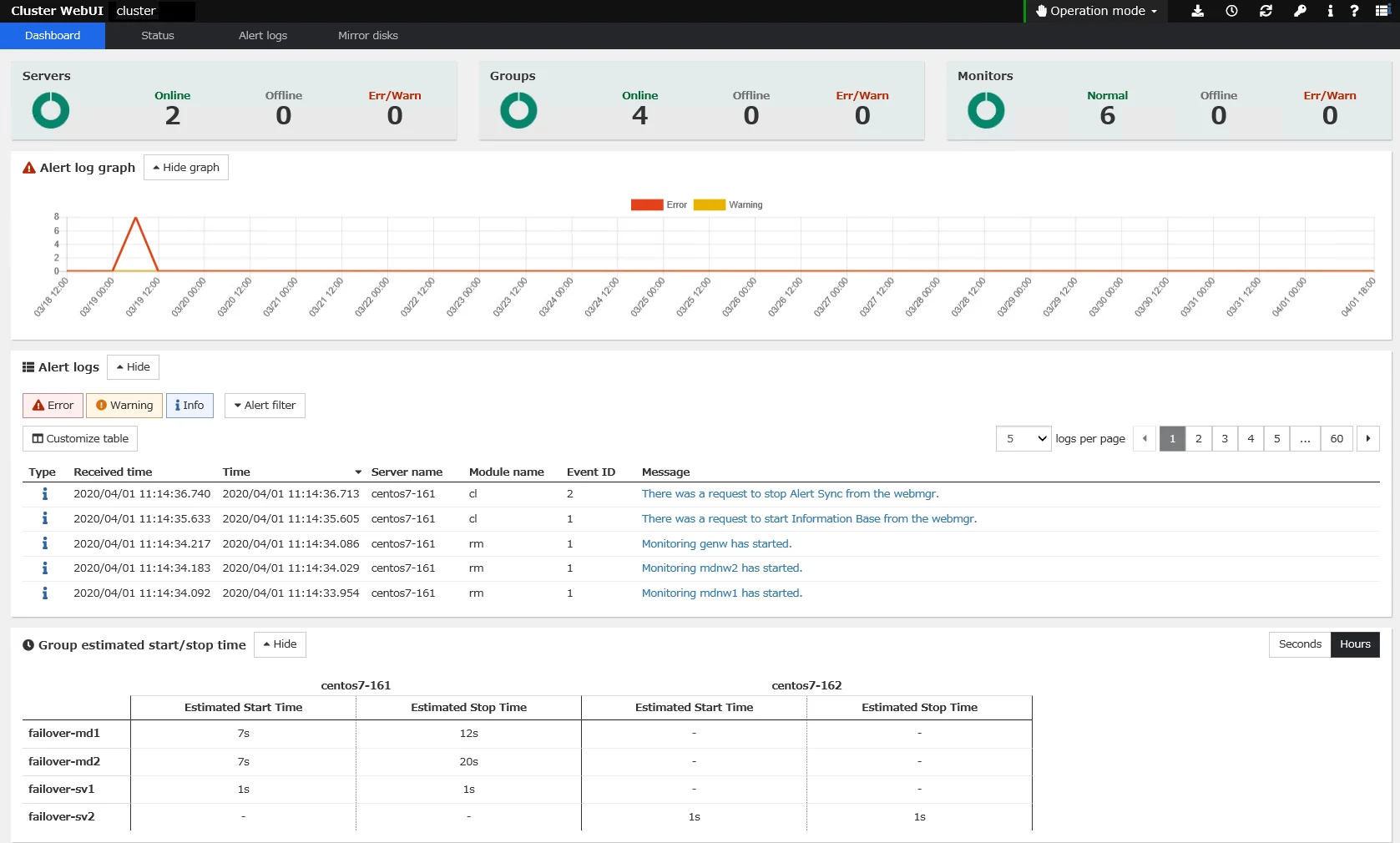
Cluster WebUI Console
Today's demanding business world requires speed regardless economic situation.
Therefore server system failure could case serious business disruption and damage.
NEC's EXPRESSCLUSTER solutions can improve your servers' robustness with reliability, flexibility and leading edge highly available technology.
Reliability
EXPRESSCLUSTER can enable up to 99.99% up time for business applications.
The product family has been continuously enhanced to meet stringent Japanese and global market requirements since its initial release in 1996.
EXPRESSCLUSTER is the market leader with No.1 market share in Asia Pacific since last 8 years and counting(*), covering wide range of applications and platforms.
EXPRESSCLUSTER is a scalable High Availability (HA) clustering solution. It can cluster up to 32 nodes and supports your IT system environment with host of flexible functions.
EXPRESSCLUSTER is well fit with complex LAN and WAN environment, comprising of physical and virtual servers as well as multiple cluster configuration.
Almost any application/database running on Windows or Linux platforms can be protected and covered by EXPRESSCLUSTER.
Leadership
EXPRESSCLUSTER is designed to support latest technologies. EXPRESSCLUSTER is one of the first software to demonstrate clustering on Microsoft Hyper-V Platform. It also supports other standard virtualization platforms like VMware vSphere, KVM and Xen.
EXPRESSCLUSTER is the first clustering software to implement Hybrid Clustering, i.e. mirroring of data in a shared disk for both LAN and WAN Environments.
In order to respond to the environmental issues, EXPRESSCLUSTER also provides power management functions to enable Green IT systems.
Solutions - EXPRESSCLUSTER X + SUSE Linux Enterprise
NEC’s High Availability software, EXPRESSCLUSTER X 3.0 is now certified and supported on SUSE Linux Enterprise Server 11. The combination of these best-of-breed software products enables fast recovery of your business critical applications and data against hardware, software, and site failures.
Enhance High Availability for SUSE Linux Enterprise users
With increasing adoption of server virtualization, flexible and unified continuity management of both physical and virtual infrastructures is required to enable comprehensive availability and recovery solutions.
Growing system complexity and Cloud computing trends are driving demand for heterogeneous hypervisor technologies as well as mixed OS environments that must be considered in continuity solutions in order to ensure scalability and reliability of critical IT services.
EXPRESSCLUSTER X and SUSE Linux Enterprise enable cost effective solutions to address these emerging IT challenges.
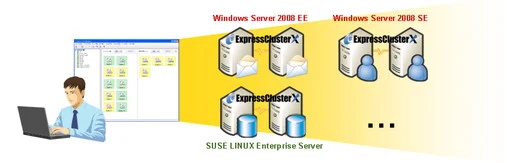
High Availability for Mixed-OS Environment
EXPRESSCLUSTER X supports multiple editions of Windows Server as well as SUSE Linux Enterprise.
EXPRESSCLUSTER X provides integrated management of multiple cluster systems regardless of OS to enable unified management of heterogeneous systems in a single console.
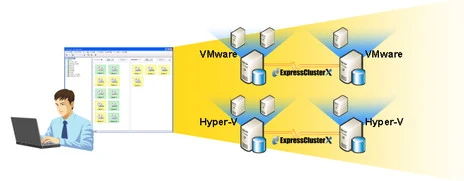
High Availability for Mixed-Hypervisor Environment
EXPRESSCLUSTER X supports broad range of hypervisors including ; VMware ESX, Windows Server 2008 Hyper-V, XenServer, Xen, KVM, Solaris Containers and PowerVM
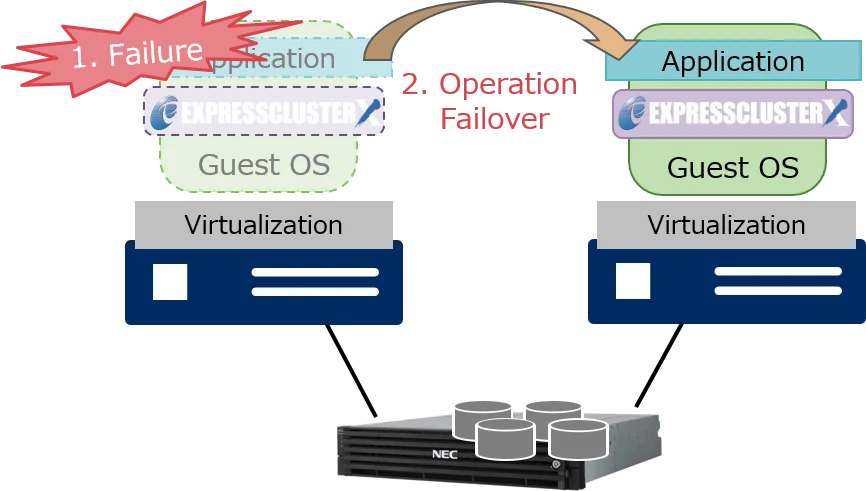
EXPRESSCLUSTER X supports both guest OS clustering & hypervisor clustering.
Enables integrated cluster management with single view
Disaster Recovery Solution for SUSE Linux Enterprise
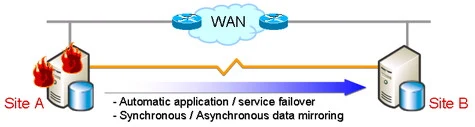
EXPRESSCLUSTER Xsupports flexible WAN deployment to enable disaster recovery solutions with application failover and synchronous / asynchronous data mirroring.
Fast automated application and data recovery for SUSE Linux Enterprise based system across different sites to minimize system disruption due to site disasters.
System Requirements - EXPRESSCLUSTER X for Windows
Linux
EXPRESSCLUSTER X 6.0
EXPRESSCLUSTER Server
WebUI / Integrated Cluster WebUI
EXPRESSCLUSTER X SingleServerSafe 6.0
EXPRESSCLUSTER X SingleServerSafe
WebUI / Integrated Cluster WebUI
EXPRESSCLUSTER X 6.0
The following tables provides general description of the EXPRESSCLUSTER system requirements for informational purpose only. Please consult your regional NEC representative for actual product offering and ordering information.
EXPRESSCLUSTER Server
Machine
x86_64 server
OS
Windows Server 2025 Datacenter Windows Server 2025 Standard Windows Server 2022 DatacenterWindows Server 2022 StandardWindows Server 2019 DatacenterWindows Server 2019 Standard
Memory
User mode : 384MB(excepting for optional products) Kernel mode : 32MB + 4MB(A single mirror/hybrid disk resource needs 4MB RAM.) X (number of mirror/hybrid resources)
Disk
Right after installation : 100MB During operation : 5.0GB + 9.0GB(A disk capacity required to use mirror disk resources and hybrid disk resources.)
For information on the software required to use each function of EXPRESSCLUSTER X, please refer to "INSTALLATION REQUIREMENTS FOR EXPRESSCLUSTER" in the "Getting Started Guide".
WebUI / Integrated Cluster WebUI
Browser
Firefox Google Chrome Microsoft Edge (Chromium)
Memory
500MB or more
Disk
200MB or more
EXPRESSCLUSTER X SingleServerSafe 6.0
The following tables provides general description of the EXPRESSCLUSTER system requirements for informational purpose only. Please consult your regional NEC representative for actual product offering and ordering information.
EXPRESSCLUSTER X SingleServerSafe
Machine
x86_64 server
OS
Windows Server 2025 Datacenter Windows Server 2025 Standard Windows Server 2022 DatacenterWindows Server 2022 StandardWindows Server 2019 DatacenterWindows Serevr 2019 Standard
Memory
User mode : 384MB(excepting for optional products.) Kernel mode : 32MB
Disk
Initial size at installation : 100MB During operation : 5.0GB
For information on the software required to use each function of EXPRESSCLUSTER X SingleServerSafe, please refer to "INSTALLATION REQUIREMENTS FOR EXPRESSCLUSTER X SINGLESERVERSAFE" in the "Getting Started Guide".
WebUI / Integrated Cluster WebUI
Browser
Firefox Google Chrome Microsoft Edge (Chromium)
Memory
Cluster WebUI : 500MB or more Integrated Cluster WebUI : 500MB or more
Disk
Cluster WebUI : 200MB or more Integrated Cluster WebUI : 200MB or more
System Requirements - EXPRESSCLUSTER X for Linux
Windows
EXPRESSCLUSTER X 6.0
EXPRESSCLUSTER Server
Supported distributions and kernel versions
WebUI / Integrated Cluster WebUI
EXPRESSCLUSTER X SingleServerSafe 6.0
EXPRESSCLUSTER X SingleServerSafe
Supported distributions and kernel versions
WebUI / Integrated Cluster WebUI
EXPRESSCLUSTER X 6.0
The following tables provides general description of the EXPRESSCLUSTER system requirements for informational purpose only. Please consult your regional NEC representative for actual product offering and ordering information.
Machine
x86_64 server aarch64
OS
x86_64 Red Hat Enterprise Linux 10.2 Red Hat Enterprise Linux 10.0Red Hat Enterprise Linux 9.8Red Hat Enterprise Linux 9.6Red Hat Enterprise Linux 9.4Red Hat Enterprise Linux 8.10MIRACLE LINUX 9.8MIRACLE LINUX 9.6MIRACLE LINUX 9.4MIRACLE LINUX 8.10Oracle Linux 10.2Oracle Linux 10.0Oracle Linux 9.8Oracle Linux 9.6Oracle Linux 9.4Oracle Linux 8.10AlmaLinux OS 10.2AlmaLinux OS 10.0AlmaLinux OS 9.8AlmaLinux OS 9.6AlmaLinux OS 9.4AlmaLinux OS 8.10Amazon Linux 2023SUSE Linux Enterprise Server 16SUSE Linux Enterprise Server 15 (SP7)SUSE Linux Enterprise Server 15 (SP6)SUSE Linux Enterprise Server 15 (SP5)SUSE Linux Enterprise Server 15 (SP4)Ubuntu Server 24.04.3 LTSUbuntu Server 24.04.1 LTSUbuntu Server 22.04.3 LTSUbuntu Server 22.04.1 LTS
aarch64 Red Hat Enterprise Linux 10.2 Red Hat Enterprise Linux 10.0 Red Hat Enterprise Linux 9.8Red Hat Enterprise Linux 9.6Red Hat Enterprise Linux 9.4Red Hat Enterprise Linux 8.10Amazon Linux 2023
Memory
User mode : 300MB(excepting for optional products.)
When the synchronization mode is used:1024 KB + (number of request queues x I/O size) + 2448 KB x number of mirror disk resources and hybrid disk resources
When the asynchronous mode is used:1024 KB + (number of request queues x I/O size) + (3072 KB + (number of asynchronous queues x I/O size) + (I/O size / 4 KB x 8 B + 0.5 KB) x (max size of history file / I/O size + number of asynchronous queues) + 400 KB ) x number of mirror disk resources and hybrid disk resources
When the kernel mode LAN heartbeat driver is used:8MB
When the keepalive driver is used:8MB
(*) Estimated I/O size is as follows: - 6MB (RHEL 10) - 6MB (RHEL 9) - 1MB (RHEL 8) (*) The I/O size varies depending on the server performance and the written amount. Theoretically speaking, the maximum I/O size is as follows: - 4GB (RHEL 10) - 4GB (RHEL 9) - 2MB (RHEL 8) (*) For the setting value of the number of request queues and asynchronization queues, see "Understanding Mirror disk resources" of "Group resource details" in the "Reference Guide".(*) For the required size of a partition for a disk heartbeat resource, see "Shared disk".(*) For the required size of a cluster partition, see "Mirror disk" and "Hybrid disk".
Disk
Right after installation : 300MB During operation : 5.0GB + 1.0GB(A disk capacity required to use mirror disk resources and hybrid disk resources.)
EXPRESSCLUSTER Server
For information on the software required to use each function of EXPRESSCLUSTER X, please refer to "INSTALLATION REQUIREMENTS FOR EXPRESSCLUSTER" in the "Getting Started Guide".
The following tables provides general description of the EXPRESSCLUSTER X SingleServerSafe system requirements for informational purpose only. Please consult your regional NEC representative for actual product offering and ordering information.
EXPRESSCLUSTER X SingleServerSafe
Machine
x86_64 server aarch64
OS
x86_64 Red Hat Enterprise Linux 10.2 Red Hat Enterprise Linux 10.0Red Hat Enterprise Linux 9.8Red Hat Enterprise Linux 9.6Red Hat Enterprise Linux 9.4Red Hat Enterprise Linux 8.10MIRACLE LINUX 9.8MIRACLE LINUX 9.6MIRACLE LINUX 9.4MIRACLE LINUX 8.10Oracle Linux 10.2Oracle Linux 10.0Oracle Linux 9.8Oracle Linux 9.6Oracle Linux 9.4Oracle Linux 8.10AlmaLinux OS 10.2AlmaLinux OS 10.0AlmaLinux OS 9.8AlmaLinux OS 9.6AlmaLinux OS 9.4AlmaLinux OS 8.10Amazon Linux 2023SUSE Linux Enterprise Server 16SUSE Linux Enterprise Server 15 (SP7)SUSE Linux Enterprise Server 15 (SP6)SUSE Linux Enterprise Server 15 (SP5)SUSE Linux Enterprise Server 15 (SP4)Ubuntu Server 24.04.3 LTSUbuntu Server 24.04.1 LTSUbuntu Server 22.04.3 LTSUbuntu Server 22.04.1 LTS
aarch64 Red Hat Enterprise Linux 10.2 Red Hat Enterprise Linux 10.0Red Hat Enterprise Linux 9.8Red Hat Enterprise Linux 9.6Red Hat Enterprise Linux 9.4Red Hat Enterprise Linux 8.10Amazon Linux 2023
Memory
User mode : 300MB (excepting for optional products) Kernel mode : When the keepalive driver is used, 8MB
Disk
Right after installation : 300MB During operation : 5.0GB
For information on the software required to use each function of EXPRESSCLUSTER X SingleServerSafe, please refer to "INSTALLATION REQUIREMENTS FOR EXPRESSCLUSTER X SINGLESERVERSAFE" in the "Getting Started Guide".
Cluster WebUI : 500MB or more Integrated Cluster WebUI : 500MB or more
Disk
Cluster WebUI : 200MB or more Integrated Cluster WebUI : 200MB or more
Solutions - EXPRESSCLUSTER X + Backup Software
EXPRESSCLUSTER X offers high availability for critical systems by immediate recovery of application and ensured data takeover. Moreover, data generation management can be enabled by integrating with backup software, leading to more robust system in terms of data protection.In addition, during business operation of stand-by system, recovery for primary active system is done using backup data in some case.
This page gives you the insights of how data backup can be configured under EXPRESSCLUSTER environment backup.
Below image shows features of each configuration.
Pattern 1: Simple Configuration
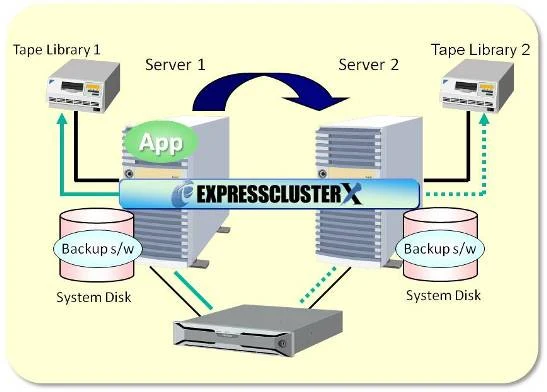
Backup in similar way as single server configuration
Backup Scenario
Backup software should be installed on both servers and running simultaneously
In normal status, backup will be done from Server 1 (Active Server) to Tape Library 1
When the application is failed over to Server 2, backup will be done from Server 2 to Tape Library 2
Benefit
As backup will be taken directly form the servers, easy operation is realized, and also backup time can be shortened compared to backup through network
Supported by these Backup S/W
Pattern 2: Low cost & low load
Backup without interfering in the application workload
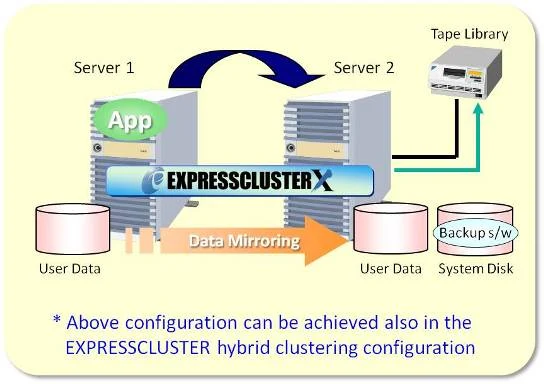
Backup Scenario
Backup software will be installed only on Server 2 which is the standby server
Snapshot data will be backed up from the disk on Server 2 which the data is being mirrored by EXPRESSCLUSTER from Server 1
Benefit
As backup will be taken directly form the servers, backup window can be shortened compared to taking backup through network
No interference in the application workload
Can be configured with single tape device
Supported by these Backup S/W
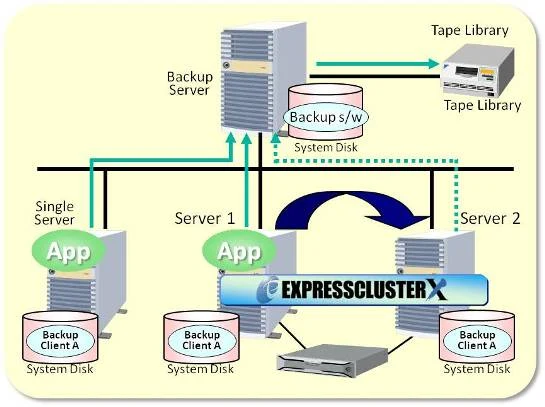
Pattern 3: Easy Operation
Data backup by single backup server
Backup Scenario
Backup up software (server/client) should be installed on the system disk of each server
Cluster system will be virtually appearing as one server from backup server and thus when the application is running on the primary server, data will be backed up from primary server, but once failover happens, backup will be done from secondary server without any manual operation
Benefit
Backup of every servers (including single server and clustered servers) can be managed from single backup server
No need to consider whether app is running on primary server or standby server
Supported by these Backup S/W
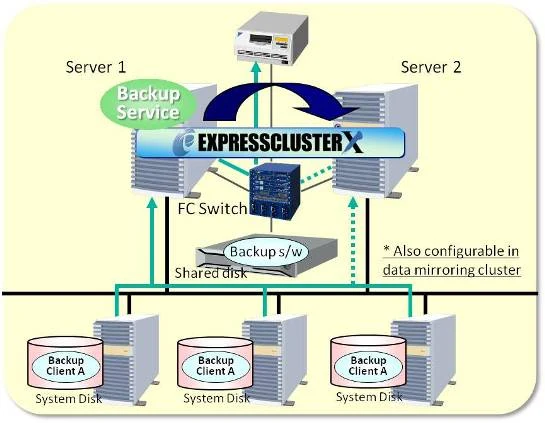
Pattern 4: High Availability
Ensuring high availability for backup server
Backup Scenario
Backup software should be installed on shared disk (or mirror disk)
In normal status, primary server (Server 1) access to backup clients and backup the data to tape library connected through FC switch
In case failure occurred on primary server (Server 1), backup service will failover to the secondary server (Server 2)
Benefit
Data can be properly backed up even in case of any failure occurred on backup server by clustering the backup server itself
Supported by these Backup S/W
ARCserve Backup
Important notes regarding data backup under EXPRESSCLUSTER environment
Except as the recovery procedure is provided specifically by backup software vendors, please follow to the recovery procedure provided by each vendor for the recovery of EXPRESSCLUSTER environment, application, etc.
Depending on the versions of EXPRESSCLUSTER and the backup software, above configuration might not be supported. In addition, some of the EXPRESSCLUSTER add-on products might not be supported in above configurations. Please contact below for any inquiries required before purchasing.
Solutions - EXPRESSCLUSTER X + SAP
SAP HANA High Availability with EXPRESSCLUSTER
EXPRESSCLUSTER Benefits for SAP HANA
SAP HANA has a high availability (HA) functionality, but it is still necessary to manually switch servers if a failure occurs. This causes an outage in operations from failure detection to completion of server failover, which can potentially lead to lost business opportunities. NEC EXPRESSCLUSTER automatically detects failures in a system that uses SAP HANA and switches to a standby server (performs failover). This can shorten operational downtime and boost operational efficiency by cooperating with SAP HANA.
EXPRESSCLUSTER X for S/4 HANA
EXPRESSCLUSTER X for SAP NetWeaver is now available and provides the functions required for clustering in SAP NetWeaver. The SAP Integration and Certification Center (SAP ICC) has certified EXPRESSCLUSTER X 5.0 on Windows Server and Linux x86_64 for integration with SAP S/4HANA 2021 via the SAP integration scenario S/4-HA-CLU 1.0.
NEC launches the SAP HA Interface Certified software, EXPRESSCLUSTER X for SAP NetWeaver. Please find the details at press release.
Press release for SAP NetWeaver
We also offer a configuration guide for clustering SAP NetWeaver with EXPRESSCLUSTER. Please click "Set up Guide" to access to SAP NetWeaver cluster configuration guide.
Guide
The database softwares supported when clustering SAP NetWeaver are the following. <Supported Database>
HANA DB (Linux Only)
SAP MaxDB (monitored by resource-agents)
SAP Sybase ASE
IBM DB2
Oracle Oracle DB
Oracle MySQL
PostgreSQL
Microsoft SQL Server (Windows only)
System Requirements - Application compatibility
The following table provides compatible applications of EXPRESSCLUSTER. (NB: Certain conditions may apply for specific applications)
Category
Software
Database
DB2
MySQL
Oracle Database
PostgreSQL
SQL Server
Sybase
ERP
ebiz Frame
Finsys ERP
Flexibizz ERP
IFS
Microsoft Dynamics NAV
Microsoft Dynamics CRM
SAP Business One
SAP ERP Central Component
SAP Adaptive Server Enterprise
Tally.ERP
SYNCHRO ERP
File Server
Samba
NFS
Application Server
IBM MQ
JBoss
WebSphere
Oracle Weblogic Server
Mail Server
Axigen Mail Server
eInteract
Exchange
hMail
IBM Domino
Kerio Connect
PostMaster
Qmail
Xgen
Zimbra
Web Server
Apache
IIS
Tomcat
Security
Challenger Security Application
Backup
ARCserve Backup
Backup Exec
NetBackup(Server Cluster configuration)
NetBackup(Client Cluster configuration)
NTBackup
Windows Server Backup
Commvault
Others
Asterisk
Axiom
IDCUBE security
LAMP
NetBackup
MasterScope
Oracle E-Business Suite
PPI MEDIA
Pumori Banking Application
SAP Crystal Reports
Shawman
Sharepoint
System Requirements - Hardware compatibility
The following table provides compatible Hardwares of EXPRESSCLUSTER. (NB: Certain conditions may apply for specific Hardwares)
Servers
vendor
product
Acer
Acer Altos
Cisco
Cisco UCS
Dell Technologies
PowerEdge
Fujitsu / Fsas Technologies
PRIMERGY
Hitachi
BladeSymphony
HA8000
HPE
ProLiant
IBM
Systems(Old xSeries)
Power
BladeCenter
Inspur
NF
i48
i24
Lenovo
System x
MITSUBISHI
FT8600
Oracle
Sun Fire X4100
Stratus
Stratus ztC Edge
SuperMicro
1UTwin
NEC
Express5800
Unisys
ES7000
rE5000
Wistron
P81D2-2P(Polaris)
System Requirements - Cloud
Cloud
The following table provides compatible Cloud of EXPRESSCLUSTER on Hyper-Converged Infrastructure. As with physical servers, installation of EXPRESSCLUSTER X on a virtual machine makes it possible to build a cluster configuration with multiple virtual machines. This makes it possible to achieve high availability against virtual machine malfunctions and software malfunctions.
AWS
Google Cloud
Microsoft Azure
Oracle Cloud Infrastructure
*alphabetical order
AWS
Platform
AWS
Vendor
Amazon Web Services LLC
Compatible Product
EXPRESSCLUSTER X 6.0/5.3/5.2/5.1/5.0/4.3/4.2/4.1/4.0/3.3/3.2/3.1 for Windows/Linux EXPRESSCLUSTER X Replicator 6.0/5.3/5.2/5.1/5.0/4.3/4.2/4.1/4.0/3.3/3.2/3.1
Note
On Amazon Virtual Private Cloud™, mirrored disk type clusters were built between instances located in different Availability Zones, and their operation was verified.
Guide
Google Cloud
Platform
Google Cloud™
Vendor
Google LLC
Compatible Product
EXPRESSCLUSTER X 6.0/5.3/5.2/5.1/5.0/4.3/4.2 for Windows/Linux EXPRESSCLUSTER X Replicator 6.0/5.3/5.2/5.1/5.0/4.3/4.2
Note
On Google Compute Engine™ virtual machines, Mirror disk type clusters were built with Google Cloud DNS and Google Cloud Load Balancing, and their operation was verified.
Guide
Microsoft Azure
Platform
Microsoft Azure
Vendor
Microsoft Corporation
Compatible Product
EXPRESSCLUSTER X 6.0/5.3/5.2/5.1/5.0/4.3/4.2/4.1/4.0/3.3/3.2/3.1 for Windows/Linux EXPRESSCLUSTER X Replicator 6.0/5.3/5.2/5.1/5.0/4.3/4.2/4.1/4.0/3.3/3.2/3.1
Note
On Microsoft Azure, mirror disk type clusters were built between Virtual Machines placed in different Fault Domains (*), and the operation was verified. (*)Fault Domain: The area affected by hardware malfunction.
Guide
Oracle Cloud Infrastructure
Platform
Oracle Cloud Infrastructure
Vendor
Oracle Corporation
Compatible Product
EXPRESSCLUSTERPRO X 6.0/5.3/5.2/5.1/5.0/4.3/4.2/4.1 for Windows/Linux EXPRESSCLUSTERPRO X Replicator 6.0/5.3/5.2/5.1/5.0/4.3/4.2/4.1
Note
HA cluster with Private Load Balancer and Public Load Balancer was built using Compute instance of Oracle Cloud Infrastructure and their operation was verified.
Guide
System Requirements - Hyper-Converged Infrastructure
Hyper-Converged Infrastructure
The following table provides compatible Hyper-Converged Infrastructure of EXPRESSCLUSTER.
EXPRESSCLUSTER X 4.1 for Windows/Linux EXPRESSCLUSTER X Replicator 4.1
Notes
Share and mirror disk type clusters were built on VxRail virtual machines and their operation was verified .
Report(Japanese version only)
System Requirements - Virtualization
Virtualization
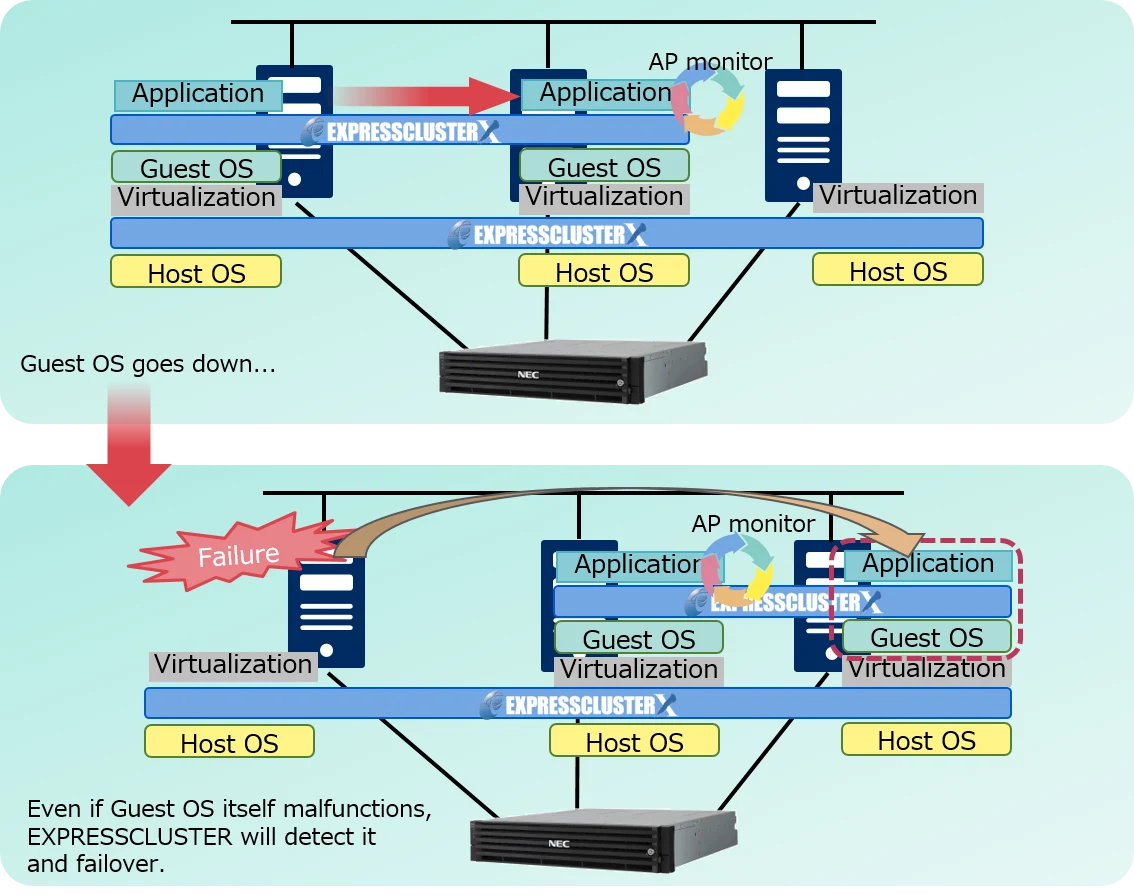
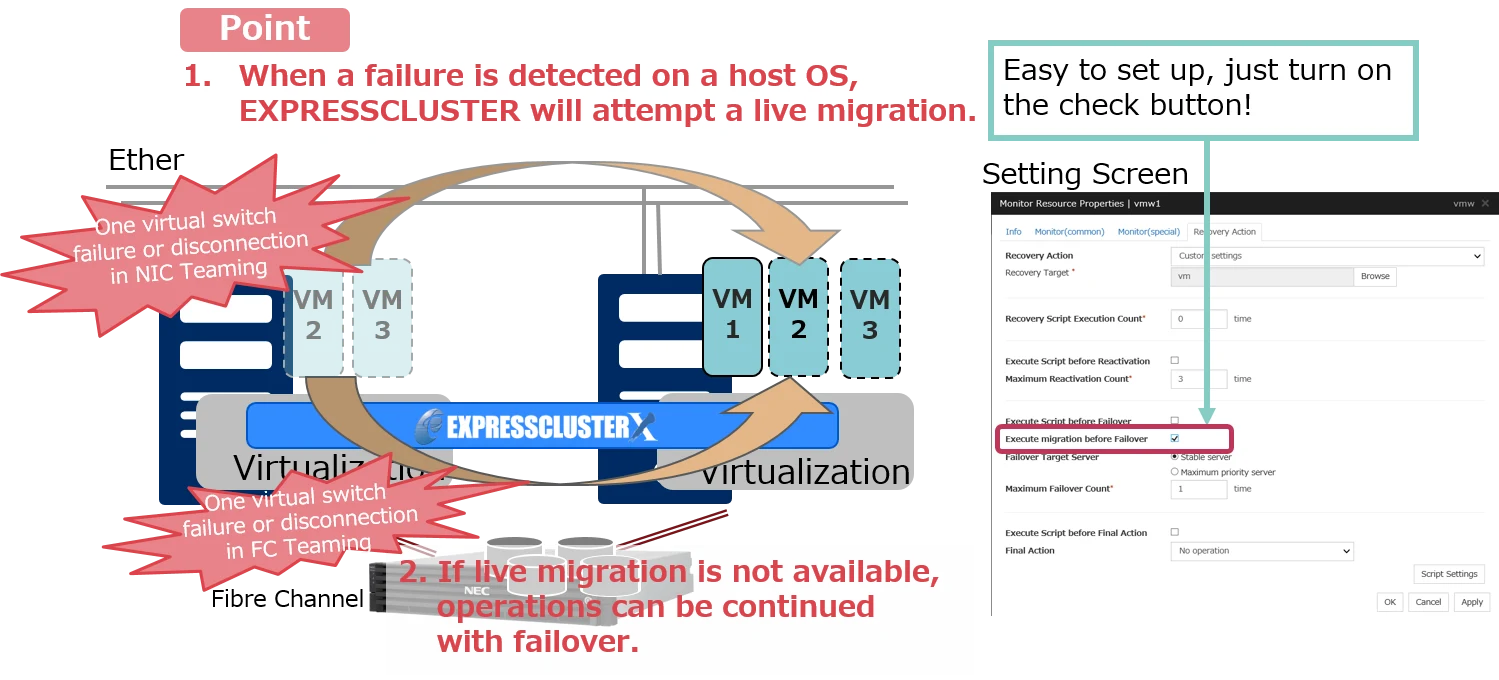
EXPRESSCLUSTER enables both Guest Cluster and Host Cluster configuration. The following correspondence table describes about virtual softwares and functions.
Y:Yes N:No
Virtulization Software
Inter-guest OS clusters
Guest-to-Host OS cooperation
Non-stop failover
Windows Server 2022 Hyper-V
Y
N
N
Windows Server 2019 Hyper-V
Y
N
N
Windows Server 2016 Hyper-V
Y
N
N
Windows Server 2012 R2 Hyper-V
Y
Y
Y*1
Windows Server 2012 Hyper-V
Y
Y
Y*1
VMware vSphere 8.0
Y
N
N
VMware vSphere 7.0
Y
N
N
VMware vSphere 6.7
Y
N
Y
VMware vSphere 6.5
Y
N
Y
VMware vSphere 6.0
Y
N
Y
VMware vSphere 5.5
Y
N
Y
Xen Server 6.5
Y
Y
Y
Xen
Y
N
N
KVM
Y
Y
Y
PowerVM
Y
N
N
Proxmox Virtual Environment
Y
N
N
Guide
*1 Only quick migration
Inter-guest OS clusters
Guest Cluster fails over the operations running on the guest OS. EXPRESSCLUSTER can operate on a virtual machine in the same way as a physical server. When constructing a guest cluster, please select a compatible EXPRESSCLUSTER product for the OS you use.
Guest-to-Host OS cooperation
Cooperation between Host OS and Guest OS capables to failover by physical failure.
Non-stop failover
In case of a failure that can be recovered by live migration, the system can be moved to the standby system without any stopping of operations. ・Compatible with virtualized infrastructure (*2) that supports live migration. ・Specifically, the FC path redundancy and NIC redundancy configuration is effective in detecting a failure in one of the paths and migrating it.
*2 VMware and Hyper-V are supported. XenServer will be supported in an upcoming update. Hyper-V requires a quick migration.
IFS and NEC Accelerate Digital Transformation of Core Industries with Domestically Managed Cloud Services and Industrial AI for the Japanese Market, Addressing Economic Security- Driving Service Expansion into Capital-Intensive Industries with Manufacturing-Focused Practical Models in FY2026 -
IT systems in business are steadily changing from mainframe environments to open system environments to run databases, billing applications, and a number of other tasks. The role played by Job management in these systems is just as large as in mainframe environments. While open systems like UNIX include certain methods for job management such as running batch files and scheduled jobs with cron, these methods do not match the capabilities of true job management. NEC Corporation offers JobCenter – a true multi-platform job management, in a versatile and easy to use package.
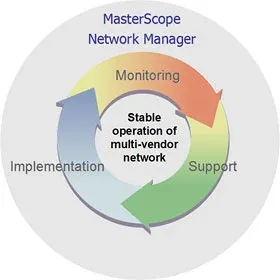
MasterScope Network Manager is operations management software for managing multi-vendor networks. In addition to managing configuration, troubleshooting, and performance of a network, Network Manager fully supports the many tasks involved in network management such as required backing up of device configuration files and software version updates. Network Manager offers comprehensive and flexible support for large to small scale networks to achieve stable network operation and optimal operational efficiency.



 x86_64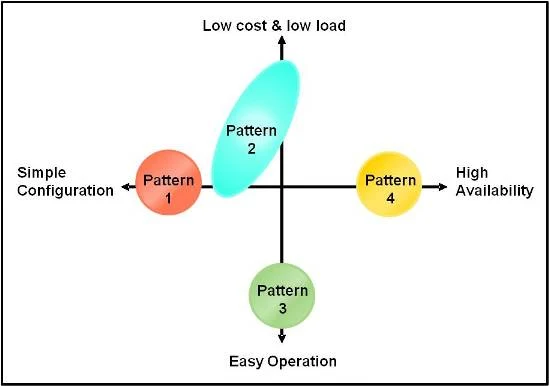

 EXPRESSCLUSTER X for SAP NetWeaver Brochure




 Nutanix